| Lesson 5 | Modeling UML class |
| Objective | Define and illustrate the class notation |
Modeling UML class Diagram
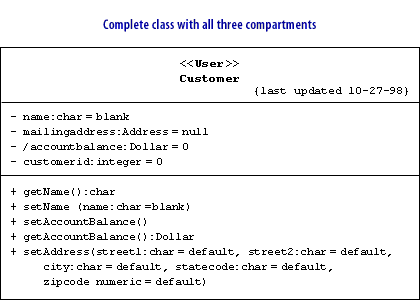
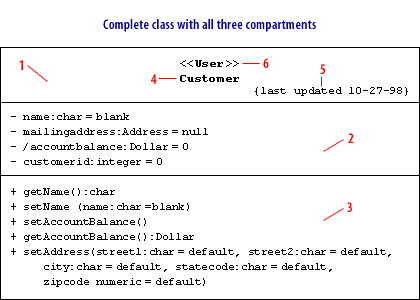
Classes are modeled using a single rectangular shape with three internal compartments: the name, attribute, and operation.
Name Compartment
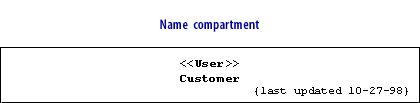
The name compartment holds the class name, an optional stereotype, and optional properties.
The name is located in the center of the compartment. The stereotype (
Properties use the constraint notation and are placed in the bottom-right corner of the compartment. Properties are basically constraints, used to clarify intent in defining the model element. Properties can be used to document the status of a class under development or for designations such as 'abstract' and 'concrete.'
The UML Class diagram is a graphical notation used to construct and visualize object oriented systems. A class diagram in the Unified Modeling Language (UML) is a type of static structure diagram that describes the structure of a system by showing the system's:
<< >>) may be used to limit the role of the class in the model, and is placed at the top of the compartment. Common examples of class stereotypes include <<Factory>>, based on the Factory design pattern, and <<Interface>>, for Java interfaces or for user interfaces.
Properties use the constraint notation and are placed in the bottom-right corner of the compartment. Properties are basically constraints, used to clarify intent in defining the model element. Properties can be used to document the status of a class under development or for designations such as 'abstract' and 'concrete.'
- classes,
- their attributes,
- operations (or methods),
- and the relationships among objects.
What is a Class?
A Class is an outline for an item. Items and classes remain forever inseparable. We cannot discuss one without discussing the other. Furthermore, the whole mark of Article Arranged Plan isn't about objects, it's about classes, since we use classes to make objects.
So a class depicts what an article will be, yet it isn't the actual item.
As a matter of fact, classes portray the kind of items, while objects are usable occurrences of classes. Each Item was worked from similar arrangement of outlines and hence contains similar parts (properties and strategies). The standard significance is that an item is an occasion of a class and item - Articles have states and ways of behaving.
As a matter of fact, classes portray the kind of items, while objects are usable occurrences of classes. Each Item was worked from similar arrangement of outlines and hence contains similar parts (properties and strategies). The standard significance is that an item is an occasion of a class and item - Articles have states and ways of behaving.
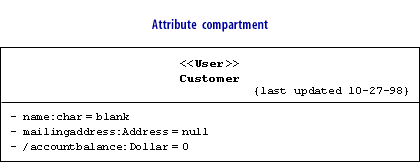
Attribute compartment
The attribute compartment simply lists the attributes of the class using the notation you learned previously. The list order does not matter.
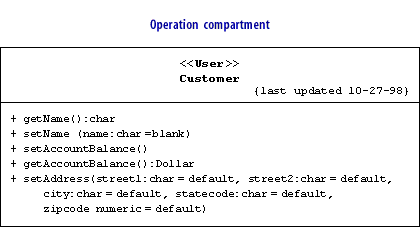
Operation compartment
Likewise, operations are simply listed in the operation compartment using the notation you learned in the previous lesson. The list order does not matter.
The completed class definition can be shown as either the entire class definition with all three compartments visible or as just the name compartment.
- Name compartment
- Attribute compartment
- Operation compartment
- Class name
- Properties
- Stereotype
Primary UML diagrams
Sometimes the primary UML diagrams, such as class and sequence diagrams, are not a perfect match for capturing certain details about your system. Composite structures help fill some of those gaps. Composite structures show how objects create a big picture. They model how objects work together inside a class, or how objects achieve a goal.
Composite structures are fairly advanced, but they're good to have in your bag of tricks because they are perfectly suited for specific modeling situations, such as showing:
Internal structures
Show the parts contained by a class and the relationships between the parts; this allows you to show context-sensitive relationships, or relationships that hold in the context of a containing classPorts
Show how a class is used on your system with portsCollaborations
Show design patterns in your software and, more generally, objects cooperating to achieve a goal Composite structures provide a view of your system's parts and form part of the logical view of your system's model,
Modeling a class
- Name compartment
- Attribute compartment
- Operation compartment
- Class name
- Properties
- Stereotype
In the next lesson, you will learn about associations.